Workshops · Webinars · Hands-On Training

Useful training people can actually use tomorrow.

Plain-English workshops for small-business owners, kids, teens, teams, chambers, libraries and community groups. No giant slide deck of buzzwords. We work through the problem, show what the tools actually do, and give people something practical to take back to work.

Small Business & Entrepreneur

Get customers. Save time. Use the tools better.

These are the signature business workshops: practical topics owners already care about, taught without assuming they have a marketing department or IT team.

60–90 minDemo Heavy

Get Hours Back: Simple Automations for Small Business

Find the repetitive admin work that does not need to keep eating the owner's week.

  • Lead and inquiry follow-up
  • Forms, intake and notifications
  • Appointment and renewal reminders
  • Moving information between email, calendars and spreadsheets
  • When not to automate something
See automation examples →
60–90 minHands-On

AI for Small Business: Use It Without Wasting Time

Go beyond “write me a Facebook post” and learn where AI can genuinely save time—and where a person still needs to be responsible.

  • Research, drafting and customer communication
  • Meeting notes, SOPs and internal documentation
  • Proposals, FAQs and first drafts
  • Working with files and business information safely
  • Choosing when AI is the wrong tool
Read the AI & technology guide →
90 minStartup Lab

Start Your Business: From Idea to Operating

A practical startup walkthrough for people who are tired of opening 37 browser tabs and still not knowing what comes first.

  • Offer and customer basics
  • Business structure and official registration resources
  • Domains, email, banking and payments
  • Website and Google presence
  • A 30-day launch sequence
Read the 12-step startup guide →

Kids & Teens

Make it. Build it. Break it. Figure out why.

Hands-on workshops and clubs for kids who learn better by doing. Programs can run as one-time workshops, short series, after-school sessions or community pop-ups.

Ages 6–845–60 minHands-On

Maker Lab: Science, Slime & Simple Builds

Low-pressure STEM for younger kids built around making something they can touch, test and take apart.

  • Simple science experiments
  • Slime, mixtures and beginner chemistry
  • Crafts with a “how does this work?” angle
  • Basic building challenges
  • Fun projects that sneak in problem-solving
Tell us you’re interested →
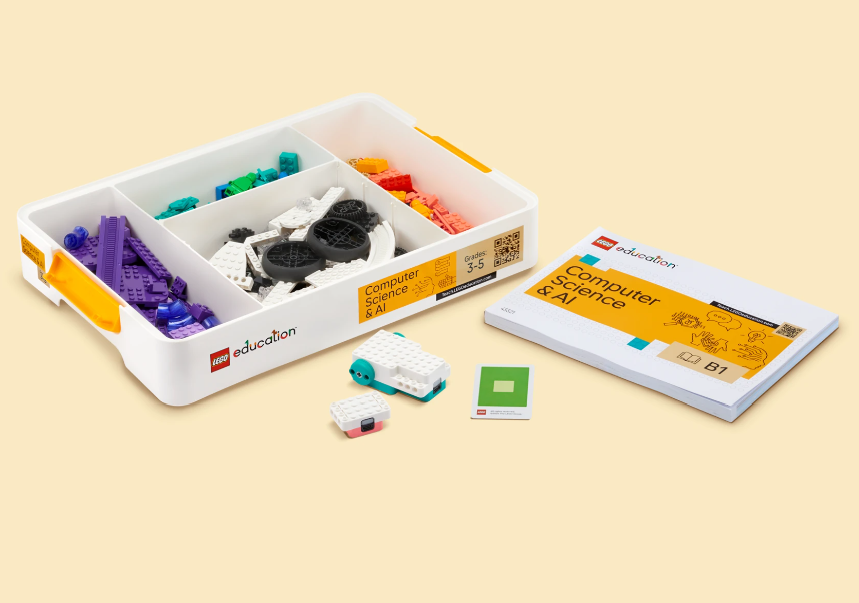
LEGO-based AI and robotics learning kit
Ages 8–1260–75 minBuild Challenge

LEGO Engineering & Robotics

Use LEGO and beginner robotics materials to solve challenges, test designs and learn by rebuilding when the first idea does not work.

  • Engineering design challenges
  • Simple machines and mechanisms
  • Beginner robotics concepts
  • Team builds and timed challenges
  • Creative problem-solving
Tell us you’re interested →
Ages 8–1260 minTech Lab

Circuits, Electronics & Tech Tuesday

Hands-on electronics using beginner-friendly components and kits so kids can see what electricity and circuits are actually doing.

  • Snap Circuits and beginner electronics
  • Inputs, outputs and switches
  • Build-and-test challenges
  • Basic troubleshooting
  • How everyday devices work
Tell us you’re interested →
Ages 8–12Club / SeriesCreative Tech

Minecraft Creative Tech Club

Minecraft becomes the shared space for building, problem-solving, collaboration and creative projects instead of just another hour of screen time.

  • Build challenges
  • Team problem-solving
  • Planning before building
  • Digital citizenship and collaboration
  • Project sharing and reflection
Tell us you’re interested →
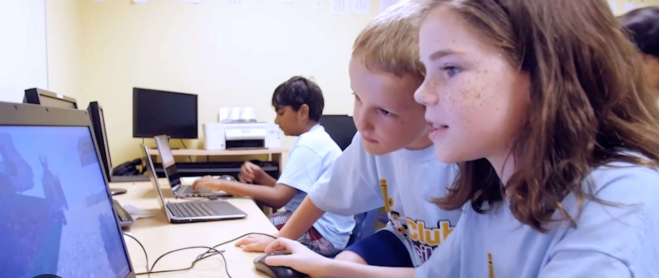
Kids working together on a coding activity
Ages 13–1860–90 minProject Based

Build for the Web: Coding, Websites & Apps

Older students work on real digital projects instead of only completing coding exercises in a sandbox.

  • HTML, CSS and beginner JavaScript
  • Simple websites and web apps
  • Designing for real users
  • AI as a coding helper—not an answer machine
  • Publishing and showing what they built
Tell us you’re interested →
Ages 8–12Club / SeriesEntrepreneurship

Kidpreneur Club

Kids turn an idea into a simple product or service while learning the basics of customers, pricing, money, marketing and problem-solving.

  • Choose a product or service idea
  • Figure out who would buy it and why
  • Set a simple price and budget
  • Create a name, sign or mini brand
  • Practice selling, explaining and improving the idea
Tell us you’re interested →
Ages 13–18Workshop / SeriesCareer Exploration

Teen Tech, AI & Digital Entrepreneurship

Explore how technology can turn an idea into something useful: a service, site, simple product, project or small business.

  • AI tools and responsible use
  • Digital marketing basics
  • Web and app ideas
  • Pricing, customers and simple offers
  • Turning a project into a portfolio piece
Tell us you’re interested →

Workplace & Teams

Build skills employees use every week.

These can be delivered as public workshops, employer training, short webinars or longer hands-on labs depending on the audience.

60 min–6 weeksBeginner–Intermediate

Microsoft 365 & Workplace Skills

Practical Word, Excel, PowerPoint, Outlook, Teams and file-management skills built around actual workplace tasks instead of feature tours.

  • Clean documents and reusable templates
  • Useful Excel formulas, tables and organization
  • Better email and calendar habits
  • Sharing and collaborating without losing files
  • Presentation basics that do not hurt to look at
Ask about team training →
60–75 minSmall Teams

Cybersecurity Without an IT Department

Simple security habits for small organizations that cannot afford to treat every employee like a cybersecurity analyst.

  • MFA, passwords and account recovery
  • Phishing and suspicious requests
  • Shared accounts and employee departures
  • Backups and critical files
  • A basic “who owns what” technology checklist
See small-business technology support →

Community Digital Skills

Technology help without talking down to people.

Libraries, senior groups, nonprofits and community organizations can host practical digital-safety and everyday-technology sessions.

45–60 minInteractive

Spot the Scam: Can You Tell What Is Real?

An interactive session built around real-world text messages, emails, pop-ups, calls and online offers so participants practice spotting warning signs instead of memorizing a lecture.

  • Urgency, fear and fake authority
  • Suspicious links and requests for payment
  • Account and password scams
  • AI-generated messages and impersonation
  • What to do when you are not sure
Ask about hosting this workshop →
60 minBeginner Friendly

Everyday Tech Confidence

A flexible session for people who want to feel more comfortable with phones, accounts, passwords, Wi-Fi, photos, apps and the everyday technology that seems to change every five minutes.

  • Safer account setup
  • Updates and permissions
  • Photos, storage and backups
  • Useful phone settings
  • Knowing when a warning is real
See local technology help →

Ways to Host

One topic can fit several rooms.

Introductory sessions can stay short and accessible. Organizations that want people to actually build something can choose a longer lab or a customized series.

Talk / Lunch & Learn

Usually 45–60 minutes. Best for chambers, networking groups, libraries and organizations introducing a topic.

Interactive Workshop

Usually 60–90 minutes. Participants bring a laptop or phone and work through examples during the session.

Hands-On Lab / Series

Longer sessions or multi-week training when the goal is to build skills, configure tools or complete real work during class.

For Chambers, Libraries, Employers & Community Groups

Want to bring one of these sessions to your group?

Introductory community and small-business workshops may be offered free when scheduling and travel make sense. Customized team training, longer labs and multi-session programs are quoted based on the format and audience.